
Building a personalized home for India's grid data
A landing page that knows a little about you needs a surprisingly small amount of machinery — one Postgres schema, one cache, one scheduler. Here is the whole thing, including the guardrail that keeps a trending list honest on a quiet day.
Until this month, every signed-in user of the Atlas landed on the same page as a first-time visitor. The page was a good page. It was also the same page on your two hundredth visit as on your first, which is a strange thing to say to someone who opens a tool three times a week.
So we built /home: a landing surface that remembers which tools you use and shows the rest of the platform what other people are reading. This post is the architecture sketch — the four boxes, the two queries that do the actual work, and a walkthrough that gets the whole stack running on your laptop under Docker.
What a home page may know
The temptation with a personalized surface is to reach for a model. Embed the user, embed the catalogue, score the cross product, ship a recommender. We decided against that for Phase 1, and the reasoning is worth stating because it shaped every table.
A recommender answers the question what might you like. The question our users actually ask on arrival is where was I. That second question has an exact answer sitting in a log, and an exact answer beats an inferred one every time. It also fails gracefully: a wrong guess from a model looks like the product misunderstanding you, while an empty recency list looks like a new account, which is what it is.
The whole personalization layer is two append-only event tables and a catalogue. Nothing in Phase 1 infers anything about anybody.
The schema is small enough to read in one screen. home.tool_usage_events holds one row per tool open, keyed to a signed-in user. home.dataset_view_events holds one row per dataset view, with a nullable user, because a signed-out reader browsing the data catalogue is evidence about what is interesting and should count.
CREATE TABLE IF NOT EXISTS home.tool_usage_events (
    id       BIGSERIAL PRIMARY KEY,
    user_id  TEXT        NOT NULL REFERENCES users (clerk_user_id) ON DELETE CASCADE,
    tool_key TEXT        NOT NULL REFERENCES home.tool_catalog (key),
    used_at  TIMESTAMPTZ NOT NULL DEFAULT NOW()
);

-- user_id is nullable on purpose: anonymous views count toward trending,
-- and deleting a user must not erase the signal.
CREATE TABLE IF NOT EXISTS home.dataset_view_events (
    id         BIGSERIAL PRIMARY KEY,
    user_id    TEXT REFERENCES users (clerk_user_id) ON DELETE SET NULL,
    dataset_id TEXT        NOT NULL,
    viewed_at  TIMESTAMPTZ NOT NULL DEFAULT NOW()
);
The two ON DELETE clauses differ, and the difference is the whole privacy posture. Deleting an account erases that account's tool history, because that history exists only to serve them. Their dataset views survive with the user detached, because those rows describe the audience.
Four boxes and one clock
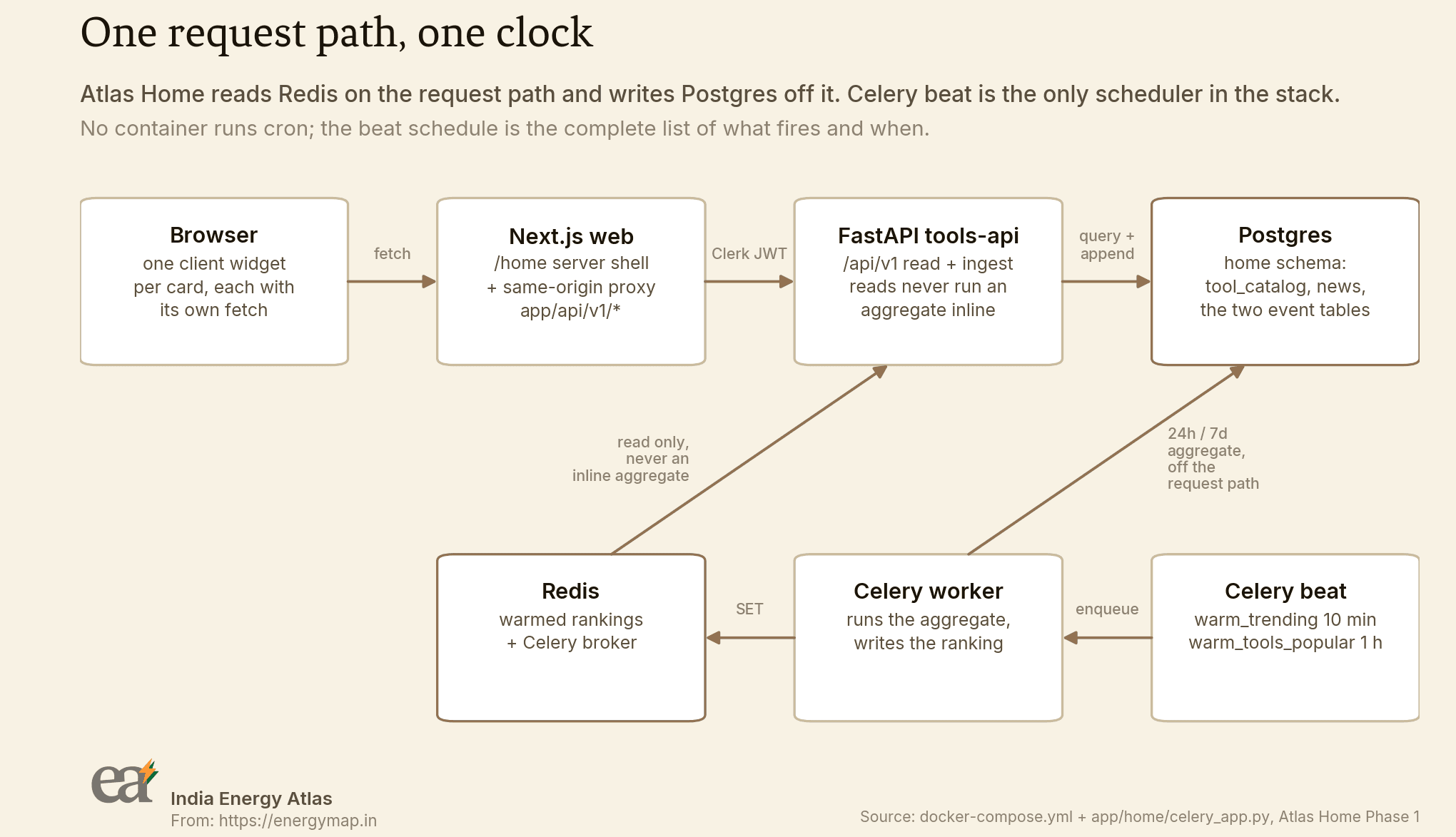
app/home/celery_app.py.Three choices in that picture were deliberate, and each one bought something specific.
One schema, mounted on its own namespace
Everything Atlas Home adds lives in a Postgres schema called home and is served under /api/v1. The service already had a /v1 surface with a /v1/me/entitlements route meaning "tool passes and credit balance". Home needs a route meaning "plan limits". Two questions that share an English name and share nothing else get two paths, and no existing consumer notices Home shipping at all.
Beat is the only clock
No container in this stack runs cron. The Celery beat schedule is the complete, reviewable list of what fires and when, and Docker Compose starts exactly one beat process, so a task cannot double-fire by being registered in two places. When someone asks what runs on a timer here, the answer is a file you can open.
TRENDING_REFRESH_SECONDS = 600       # handoff section 7: every 10 minutes
TOOLS_POPULAR_REFRESH_SECONDS = 3600 # handoff section 8: cached 1h

celery_app.conf.update(
    timezone="UTC",
    enable_utc=True,
    beat_schedule={
        "warm-trending": {
            "task": "app.home.tasks.warm_trending",
            "schedule": TRENDING_REFRESH_SECONDS,
        },
        "warm-tools-popular": {
            "task": "app.home.tasks.warm_tools_popular",
            "schedule": TOOLS_POPULAR_REFRESH_SECONDS,
        },
    },
)
The endpoint cache TTLs are longer than the refresh cadences on purpose. A missed tick degrades to a slightly stale list. The failure mode we were designing away from is the one where a broken warmer produces an empty page and nobody notices for a week.
Every widget fetches its own data
The /home route is a server component that resolves exactly two facts — the rollout flag and the session — and then hands off to a client tree. Nothing is awaited server-side, so the shell paints with skeletons and each card hydrates when its own fetch lands. A slow trending query cannot hold up the greeting, and a failed news call leaves a single empty panel.
Those client fetches go to same-origin route handlers under app/api/v1/*, which proxy to the FastAPI service. Proxying keeps the Clerk session token server-side and spares every widget mount a cross-origin preflight.
Trending needs a floor
This is the most interesting engineering detail in Phase 1, and it is one comparison.
A trending list is a claim about an audience. On a busy day, raw view counts support that claim. On a quiet Sunday, the top of a raw-count list is one enthusiastic person hitting refresh — and we would be publishing that as "trending" on the first page a visitor sees. The guardrail is that a dataset needs at least three distinct viewers inside the window before it is eligible to rank at all.
SELECT dataset_id,
       COUNT(*) AS views,
       COUNT(DISTINCT user_id)
         + COUNT(*) FILTER (WHERE user_id IS NULL) AS distinct_viewers
  FROM home.dataset_view_events
 WHERE viewed_at > NOW() - make_interval(hours => %s)
 GROUP BY dataset_id
The FILTER clause is the subtle half. A plain COUNT(DISTINCT user_id) collapses every anonymous row to nothing, because they all share a NULL. Anonymous views would then be worth zero toward the floor, and trending would quietly become a description of our signed-in members. Counting each anonymous row as its own viewer treats it as evidence of a visitor we cannot name.
The ranking itself is a pure function in app/home/trending.py, so the floor is unit-testable without a database:
MIN_DISTINCT_VIEWERS = 3

eligible = [r for r in rows if r.distinct_viewers >= min_distinct_viewers]
# Ties break on dataset_id so a refresh with unchanged counts produces an
# unchanged ranking - otherwise every tick would emit phantom deltas.
eligible.sort(key=lambda r: (-r.views, r.dataset_id))
Here is the floor doing its job on a seeded local stack. Five datasets have views in the window. One of them, deliberately named, was seen by two people:
$ psql "$DATABASE_URL" -c "SELECT dataset_id, COUNT(*) AS views, ..."

        dataset_id         | views | distinct_viewers
---------------------------+-------+------------------
 iex-dam-prices            |    14 |                8
 resd-installed-capacity   |     9 |                7
 state-demand-hourly       |     7 |                6
 substation-registry       |     5 |                5
 quiet-dataset-below-floor |     2 |                2
(5 rows)$ curl -s localhost:8055/api/v1/home/trending-datasets?limit=5 \
| jq -c '.items[] | {dataset_id, views, distinct_viewers, rank}'
{"dataset_id": "iex-dam-prices", "views": 14, "distinct_viewers": 8, "rank": 1}
{"dataset_id": "resd-installed-capacity", "views": 9, "distinct_viewers": 7, "rank": 2}
{"dataset_id": "state-demand-hourly", "views": 7, "distinct_viewers": 6, "rank": 3}
{"dataset_id": "substation-registry", "views": 5, "distinct_viewers": 5, "rank": 4}Four rows, ranked. The two-viewer dataset is gone. A list of four honest entries serves a reader better than a list of five with a lie at the bottom, and on a genuinely quiet day the panel is allowed to be short.
One more detail worth stealing: each refresh reads the previous ranking back before computing the new one, so every item can carry a rank_delta. A dataset with no history gets null, which the frontend renders as a dash. Inventing a direction for something that has never been ranked would be the same category of small lie as the one the floor exists to prevent.
Jump back in, or popular
The tools row on /home has two forms. If you have opened tools before, the heading reads Jump back in and the row is your last three distinct tools in recency order. If you have not, the heading reads Popular tools and the row is the platform-wide ranking. The heading changes with the content, so the row never presents a stranger's history as yours and never renders empty.
The recency query is one statement, and the index was written for it:
SELECT DISTINCT ON (tool_key) tool_key, used_at
  FROM home.tool_usage_events
 WHERE user_id = %s
 ORDER BY tool_key, used_at DESC

-- backed by:
CREATE INDEX tool_usage_events_user_used_idx
    ON home.tool_usage_events (user_id, used_at DESC);
Postgres DISTINCT ON keeps one row per tool_key — the first one the ORDER BY reaches, which is the most recent. De-duplication and recency fall out of the same statement, and the caller-scoped index means the planner never walks a stranger's rows.
        tool_key        |            used_at
------------------------+-------------------------------
 bill-reduction-planner | 2026-08-30 00:47:31.099292+00
 ci-tariff-optimizer    | 2026-08-29 11:15:17.115153+00
 demand-charge-bess     | 2026-08-29 05:49:33.238967+00
 ev-charging-cost       | 2026-08-28 06:23:32.868612+00
 open-access-analyst    | 2026-08-29 22:15:25.492933+00
 ppa-bid-strategist     | 2026-08-27 15:24:28.056649+00
 ppa-reviewer           | 2026-08-30 05:44:36.760783+00
 rooftop-solar-roi      | 2026-08-29 21:35:00.396401+00
 storage-pro-forma      | 2026-08-30 03:21:06.852412+00
(9 rows)
The session guard is the load-bearing part
None of the above is worth anything if the events lying underneath it are inflated. Tool pages fire their event once per session per tool, guarded by sessionStorage under a key of the shape home:tool-usage:{tool_key}. Dataset pages do the same under their own prefix.
The guard is a correctness rule. Recency is a list and trending is a ranking, so a reader who refreshes a page ten times must not outweigh ten readers who opened it once. A browser session is exactly the window over which one visit should count once, and it clears with the tab, so tomorrow's visit is honestly a new signal.
Two things in the emitter took a second pass to get right:
export function claimSessionEvent(key: string): boolean {
  const store = sessionStore();
  if (store) {
    try {
      if (store.getItem(key) !== null) return false;
      store.setItem(key, "1");
      return true;
    } catch {
      // Quota exhausted mid-session; fall through to the memory guard.
    }
  }
  if (memoryGuard.has(key)) return false;
  memoryGuard.add(key);
  return true;
}
The claim is written before the network call. React StrictMode double-invokes effects in development, and a claim taken after the response arrives lets both invocations through and double-counts the visit. Second, sessionStorage throws on access in Safari private mode and in partitioned iframes, so there is a module-level fallback set that keeps the once-per-document promise where the browser gives us nothing better.
The POST itself is fire-and-forget with keepalive, and it swallows every outcome. The most common way to leave a tool page is to click straight through to something else, and keepalive lets the request outlive that navigation. A dropped event costs one row in a ranking; a tool page that breaks because telemetry failed would cost a great deal more.
Run it on your laptop
Everything below runs on local Docker. No cloud account, no managed database, no credentials beyond the placeholders the Makefile supplies. What follows is a transcript of a run on a clean clone of the backend repository at the Phase 1 tip.
One caveat, stated plainly: the two Atlas repositories are private today, so the git clone on the first line works for people with access. Everything that makes the walkthrough interesting is on this page regardless — the schema, both queries, the beat schedule and the endpoint shapes are quoted in full above, and the Compose file is an ordinary Postgres, Redis, API, worker and beat stack with no managed service anywhere in it.
The host ports are overridable, because several worktrees of this repository tend to be up at once. The capture below uses non-default ports for exactly that reason; drop the exports and you get 5434, 6379 and 8000. The first run also builds the API image, which is where most of those two minutes go.
$ git clone --depth 1 https://github.com/India-Energy-Atlas/espresso-india-transmission-map.git
$ cd espresso-india-transmission-map
$ export ATLAS_DB_PORT=5455 ATLAS_REDIS_PORT=6399 ATLAS_API_PORT=8055
$ export DATABASE_URL="postgresql://grid:grid@localhost:5455/grid"
$ export REDIS_URL="redis://localhost:6399/0" API_BASE="http://localhost:8055"
$ make up

 Container blog-clean-redis-1  Healthy
 Container blog-clean-db-1  Healthy
 Container blog-clean-beat-1  Started
 Container blog-clean-worker-1  Started
 Container blog-clean-api-1  Started
waiting for api health...
stack up: api http://localhost:8055
make up  0.46s user 0.53s system 0% cpu 1:54.70 total
Migrations are raw, additive .sql files applied in lexicographic order by a runner that is deliberately not a migration framework. This phase's revision ships a tools_052_home_phase1_down.sql companion behind make migrate-down, and re-running the forward target is a no-op.
$ make migrate

applying sql/migrations/tools_050_utility_grant_compat.sql
applying sql/migrations/tools_051_my_grid_agent_delivery_policy.sql
psql:...tools_051_my_grid_agent_delivery_policy.sql:14: NOTICE:  constraint
  "my_grid_alert_preference_in_app_always_on" of relation
  "my_grid_alert_preference" does not exist, skipping
applying sql/migrations/tools_052_home_phase1.sql
migrations applied$ make seed
Using CPython 3.14.0 interpreter at: /opt/homebrew/opt/python@3.14/bin/python3.14
Creating virtual environment at: .venv
Installed 100 packages in 207ms
seeded 13 tools, 3 news items
$ make demo
seeded 13 tools, 3 news items
seeded demo users + {'tool_usage_events': 90, 'dataset_view_events': 37}
{'count': 4}
{'count': 13, 'cold_start': False}The last two lines are the beat tasks, invoked by hand so you do not have to wait ten minutes for the first tick. warm_trending ranked four datasets from the thirty-seven seeded view events — the fifth was held back by the floor. cold_start: False on the second is the flag that tells an operator whether the popular row is a real ranking or the curated default order.
$ curl -s -i -X POST localhost:8055/api/v1/events/dataset-view \
    -H 'Content-Type: application/json' -d '{"dataset_id":"iex-dam-prices"}'

HTTP/1.1 202 Accepted
x-atlas-deployment: development
{"status":"accepted"}

$ curl -s -i localhost:8055/api/v1/home/tools/recent

HTTP/1.1 401 Unauthorized
{"detail":"Bearer token required"}
Both of those are the design. Dataset views are accepted from anonymous callers, which makes trending a description of everyone who reads the market pages. The recency route refuses an unauthenticated caller, because "your recent tools" has no meaning without a "your".
There is one more target, and it is the one worth running. make e2e-home drives both surfaces over real HTTP and asserts the behaviours this post has been describing, including the floor checked at its inclusive boundary:
$ make e2e-home

2. WARM USER - tool-usage events must produce the Jump-back-in branch
  [PASS] POST /events/tool-usage storage-pro-forma -> 202
  [PASS] recent returns exactly 3 tools - got 3
  [PASS] recent de-duplicates a re-opened tool
  [PASS] recent is in recency order, re-opened tool first
  -> frontend renders: "Jump back in" ['storage-pro-forma', 'dam-copilot', 'site-scout']

3. TRENDING - the >= 3 distinct-viewer floor, at the boundary
  [PASS] an anonymous dataset view is accepted -> 202
  warm_trending() -> {'count': 5}
  [PASS] e2e-trending-three-viewers (3 distinct viewers) is included
  [PASS] e2e-trending-two-viewers (2 distinct viewers) is excluded

RESULT: PASS - every assertion held
The warm-user case deliberately re-opens the first tool last, so insertion order and expected order disagree and a naive "last three rows" implementation cannot pass. The exclusion assertion runs against a populated ranking, since an empty list excludes everything and proves nothing.
To see the surface itself, point a checkout of the web repository at the local API and start it with the rollout flag on:
$ NEXT_PUBLIC_HOME_V1=1 \
  ATLAS_API_URL=http://localhost:8055 \
  NEXT_PUBLIC_ATLAS_API_URL=http://localhost:8055 \
  pnpm dev
With the flag unset, /home answers a real 404 and the marketing landing page is unchanged. Signed out with the flag on, it redirects to sign-in. Both of those are request-time decisions — the route is force-dynamic, because a flag-off prerender served as a static 200 would be a rollout switch that does not switch.
What Phase 1 leaves open
Three things are deliberately absent. There is no scoring model, and there will not be one until the recency list stops being enough. The news panel is curated by hand, so an editor decides what appears under "what's new". And the whole surface sits behind an opt-in flag, so the default landing experience for a reader arriving at a Gujarat, Tamil Nadu or Rajasthan page is exactly what it was last week.
The next phase adds saved views and a card refresh cadence, and with them the first new entry this beat schedule has gained since it was written. The scheduled agents come after that, and they bring the 60-second tick the schedule does not have yet.
If you want to poke at the data underneath all of this, the public catalogue is at /data. Plan limits on Atlas Home are enforced server-side on every write path, and what each plan includes lives on the pricing page.
Sources: sql/migrations/tools_052_home_phase1.sql, services/tools-api/app/home/ and lib/home/session-events.ts in the India Energy Atlas repositories. Every terminal capture on this page is pasted from a run on a clean clone at the Phase 1 tip, on 30 August 2026.