
Pinning a live map to a home page without loading the map
A pinned map card is a photograph, taken on a schedule by a headless browser. Here is the pipeline that takes it, the render mode that stops it coming out blank, and the Postgres constraint that lets a whole ordering be rewritten in place.
The most common request we get about the new personal home page is the simplest one to state and the hardest one to serve: put my map on it. Someone has spent a while on the India infrastructure map getting the layers and the camera the way they want them, and they would like that view waiting for them tomorrow morning, already built.
This post is how that shipped, which is mostly a story about what we decided not to render. The card on the home page is a PNG. A headless browser takes it on a schedule, and the whole apparatus — the beat task, the browser, the image store — runs on a laptop under Docker with no cloud account anywhere in it.
What a map on a landing page costs
An interactive map is one of the most expensive things a web page can contain. Ours is MapLibre GL: a WebGL context, a style document, vector tiles fetched as the camera settles, and a few hundred kilobytes of JavaScript before any of that starts. On a page built to show a map, that is the price of admission and worth paying.
A home page is not that page. It is the surface someone lands on, scans, and leaves — the median look at a card there is a couple of seconds long, and it usually ends in a click through to somewhere else. Mounting the live map renderer in a card would mean every signed-in user paid a map's worth of bundle, GL context and tile traffic on every visit, to produce a picture they glance at. Multiply by a second pinned card and the landing page becomes the heaviest route on the site.
The question is not how to make a map cheap enough to put on a landing page. It is whether the card needs to be a map at all.
A picture, on a schedule
It does not. What a reader wants from a pinned card on arrival is the shape of the thing — where the congestion is today, whether prices did something odd overnight. That is a picture. Interaction is what they want after they decide the card is worth opening, and by then they can be on the live page.
So a pinned card is a snapshot: the real route, rendered in headless Chromium on a schedule, stored as a PNG, served as an image. Charts get exactly the same treatment, which is the part that made the decision easy. A map and a chart have nothing in common as components and everything in common as URLs, so one mechanism covers both and there is no second pipeline to keep in step.
The cost is real, and it is worth stating plainly up front. A snapshot card is as fresh as its refresh interval and not one second fresher. If a pin refreshes daily, the picture can be nearly a day old, and during a grid event that is a card telling you about yesterday. Nothing about the design hides this: every pin row carries a snapshot_at, the card renders the age of the picture underneath it, and Open goes to the live surface. The card is honest about being a photograph, and the live thing is one click away.
The second cost is interactivity, and it is why this is version one. You cannot pan a snapshot. For a landing surface that is an acceptable trade; for a card someone wants to work inside, it is not, which is what a later live embed mode is for.
What takes the picture
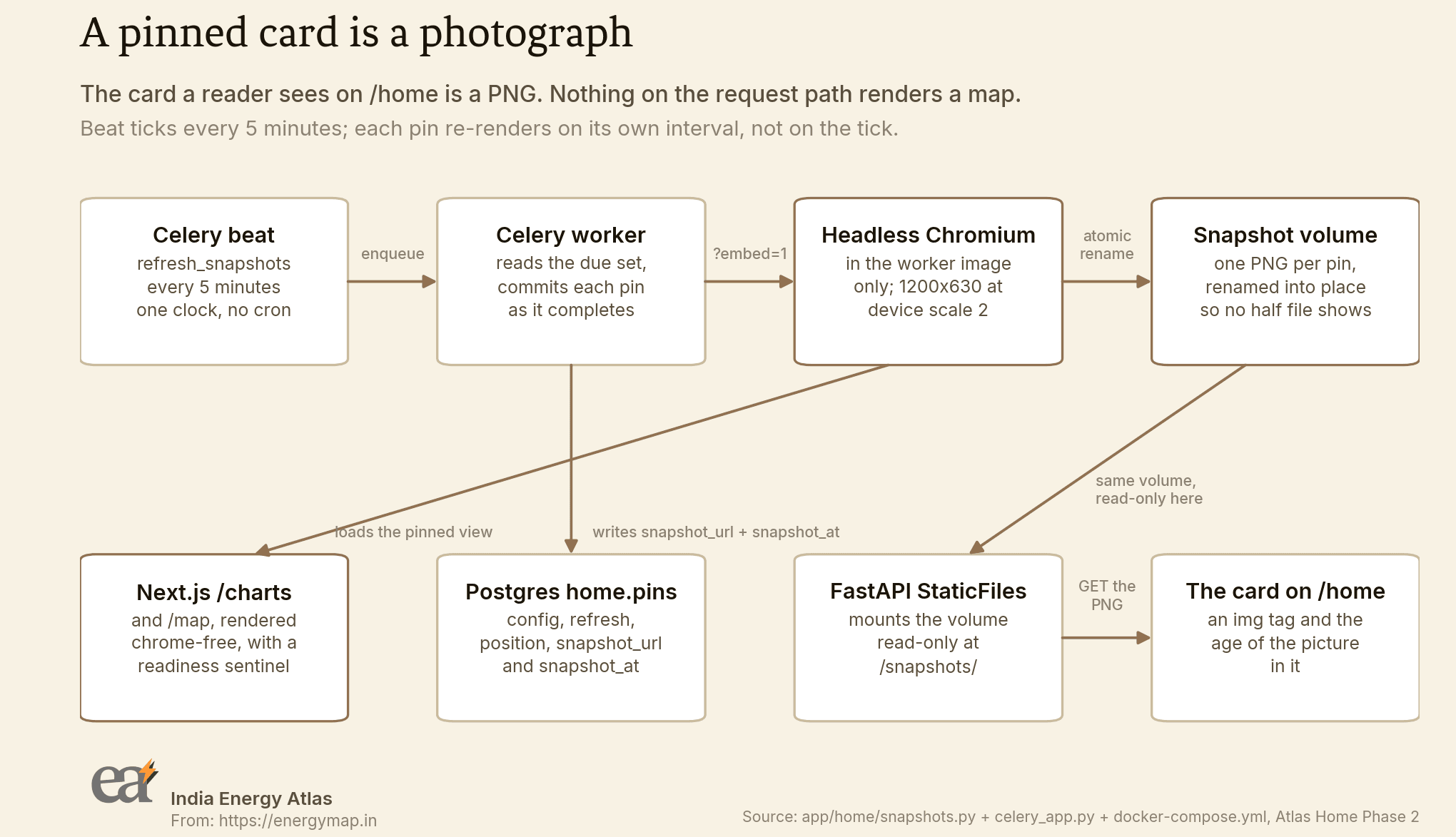
app/home/celery_app.py.There is one scheduler in this stack and it is Celery beat. The Atlas Home phase before this one registered two cache warmers; this phase appends a third entry and that is the entire scheduling change.
SNAPSHOT_REFRESH_SECONDS = 300

    beat_schedule={
        "warm-trending": {
            "task": "app.home.tasks.warm_trending",
            "schedule": TRENDING_REFRESH_SECONDS,
        },
        "warm-tools-popular": {
            "task": "app.home.tasks.warm_tools_popular",
            "schedule": TOOLS_POPULAR_REFRESH_SECONDS,
        },
        "refresh-snapshots": {
            "task": "app.home.tasks.refresh_snapshots",
            "schedule": SNAPSHOT_REFRESH_SECONDS,
        },
    },
Five minutes is the tick, not the refresh rate. The tick is the resolution of the clock: it matches the shortest interval a pin is allowed to hold, so a fast pin is never more than a tick late, and a slower pin is untouched until its own interval has elapsed. That distinction lives in the due-set query, which means adding a new interval is a change to one CASE and nothing else.
WHERE pin_type IN ('map', 'chart')
  AND (snapshot_at IS NULL
       OR snapshot_at <= NOW() - CASE refresh
              WHEN '5m'  THEN INTERVAL '5 minutes'
              WHEN '1h'  THEN INTERVAL '1 hour'
              WHEN '6h'  THEN INTERVAL '6 hours'
              WHEN '24h' THEN INTERVAL '24 hours'
          END)
ORDER BY snapshot_at NULLS FIRST
LIMIT %s
A pin that has never rendered sorts to the front, because NULLS FIRST puts a brand-new card ahead of a stale one — a user who just pinned something is waiting, and a user with a card from an hour ago is not. The LIMIT bounds one tick's work, so a backlog drains oldest-first over several ticks; the alternative is one tick trying to render everything and timing out.
The task itself is short, and two of its decisions are worth pulling out.
for pin in due:
    pin_id = pin["id"]
    try:
        url = snapshots.target_url(pin)
        bytes_written += snapshots.render_png(url, snapshots.snapshot_path(pin_id))
    except Exception as exc:
        log.error("refresh_snapshots failed for pin %s: %s", pin_id, exc)
        failures.append(pin_id)
        continue
    with connection.cursor() as cur:
        store.sync_record_snapshot(cur, pin_id, snapshots.snapshot_url(pin_id))
    connection.commit()
    rendered += 1

if failures:
    raise RuntimeError(
        f"refresh_snapshots could not render {len(failures)} of {len(due)} due "
        f"pins: {', '.join(failures)}"
    )
Each pin commits on its own as it completes. One bad config in a batch must not roll back twenty other people's cards, and a crash halfway through a long batch should keep everything that already rendered. But the task still raises at the end if anything failed, because a snapshot pipeline that quietly renders nothing looks identical, from the outside, to one with no due pins. Our service-level agreement has a rule against exactly that shape of silence, and a failed Celery task is the cheapest way to honour it.
The browser lives in one image
Playwright and Chromium are installed in the worker image and nowhere else. The API process never renders anything — it serves a directory — and a few hundred megabytes of browser and shared libraries on an image that cannot use them is paid for on every build and every deploy of that container.
FROM base AS worker

ARG PLAYWRIGHT_VERSION=1.62.0

RUN pip install "playwright==${PLAYWRIGHT_VERSION}" \
    && playwright install --with-deps chromium \
    && rm -rf /var/lib/apt/lists/*

ENV HOME_SNAPSHOT_DIR=/data/snapshots
Both pins in that stanza are deliberate. playwright install downloads the browser build matching the client library exactly, so an unpinned client silently changes which Chromium renders your snapshots between two builds of the same commit. And the base image is pinned to python:3.12-slim-bookworm, not the floating slim tag, because slim moved to a newer Debian where the font packages --with-deps asks for no longer exist, and the worker stage stopped building. A base image that changes its Debian major version underneath a green build is not a base image.
Chromium needs three flags to run at all in a container, and the middle one is the non-obvious one:
CHROMIUM_ARGS = [
    "--no-sandbox",
    "--disable-dev-shm-usage",
    "--enable-unsafe-swiftshader",
]
A containerised headless browser has no GPU. Without a software rasteriser, new maplibregl.Map throws on WebGL initialisation and the map card is blank forever. --disable-dev-shm-usage keeps Chromium off the 64 MB /dev/shm a container gets by default, which a frame this size overruns.
Where the PNGs live
On a Docker volume. The worker mounts it read-write, the API mounts the same volume read-only and serves it through FastAPI's StaticFiles at /snapshots/. There is no object store and no bucket in this design, which was a constraint before it was a preference — this whole stack has to come up on a laptop — and turned out to be the right shape anyway. One writer, one reader, one directory.
The write is a rename, not a write in place. /snapshots/ is being served while a render is happening, and a half-written PNG handed to a browser is a broken image on somebody's home page. The screenshot lands on a temporary file in the same directory and is renamed over the destination, which is atomic within one filesystem, so a reader gets either the previous snapshot or the new one and never something in between.
The render mode a pinnable page needs
Here is the part that took the longest, and the part most likely to bite anyone building this. A page that can be pinned must be able to render itself for a machine.
Point a headless browser at a normal application route and it does not photograph your data. It photographs your navigation rail, your fixed header, your announcement bar, your cookie notice and your floating sign-up prompt — a headless browser has no session and no scroll history, which is precisely the state every one of those widgets is written to appear in. At 1200 by 630 there is nothing left for the chart.
So every pinnable surface answers to ?embed=1, and the two routes the snapshot worker resolves a pin to are built around it:
map   {"view_key": "india-infrastructure", "params": {...}}
      -> /map/india-infrastructure?embed=1&config=<json>

chart {"chart_key": "iex/price-heatmap", "params": {...}}
      -> /charts/iex/price-heatmap?embed=1&config=<json>
The key rides in the path and the whole config rides in the query string. The path is what makes the URL readable in a log; the config parameter carries params — the layer set, the camera, the date range — which the path cannot express and which is the only reason a pin can be reconstructed at all.
With embed=1 the route renders a fixed-size stage with a title, the visual, and nothing else. Without it, the same URL is a human following a pin, so it redirects to the live page the card came from. And that redirect is exactly how we learned what the contract is worth. Here are two frames from the same worker, the same browser, the same chart, seconds apart:
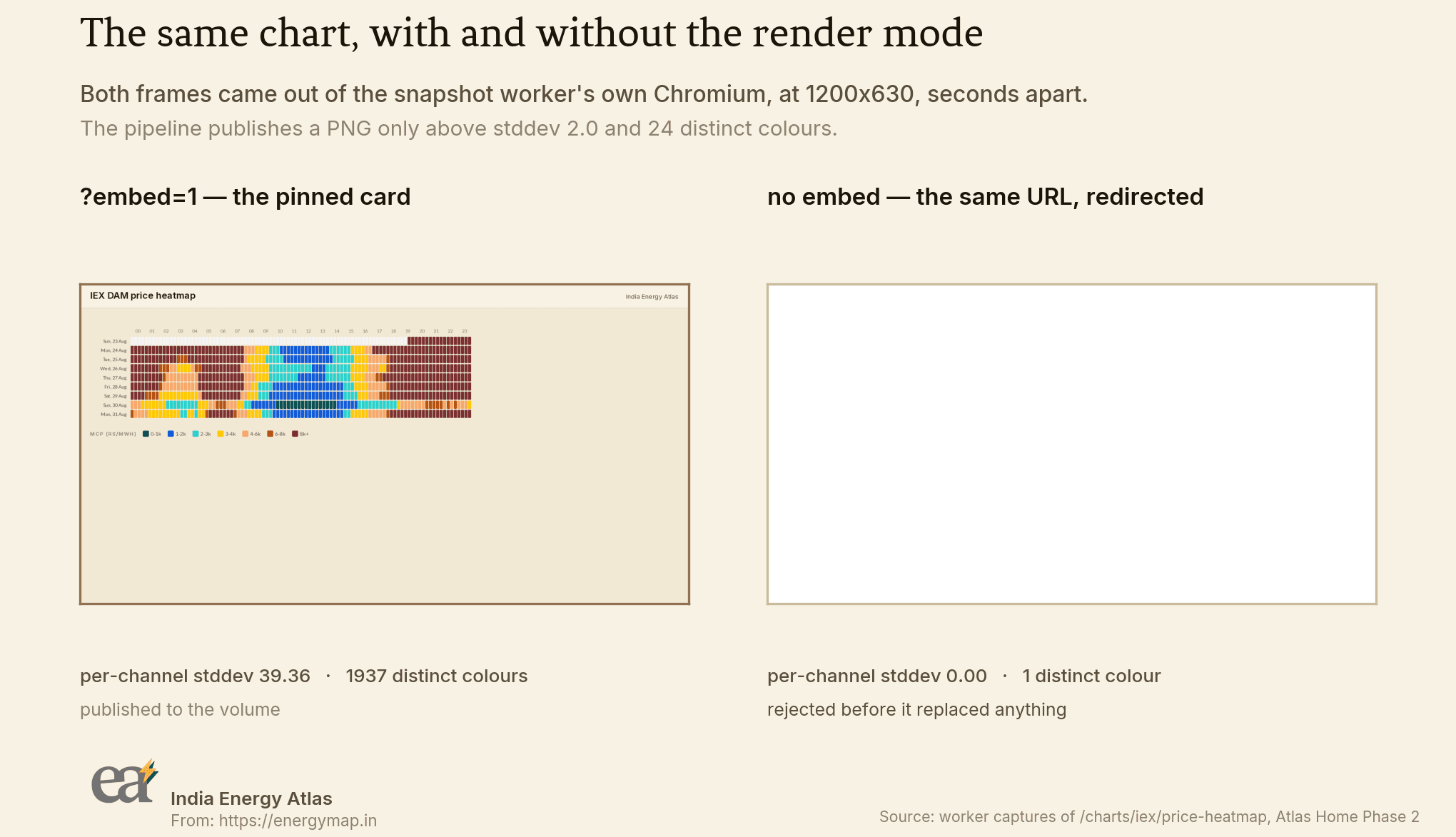
?embed=1, captured by the snapshot worker's own Chromium. Measured with the pipeline's blank check.The right-hand frame is a redirect, faithfully photographed. Dropping embed=1 sent the worker to the live market page, the live market page is behind our authentication middleware, and the worker has no session — so it landed on an identity handshake with an empty title and photographed it:
# where the browser actually ended up, with embed=1 dropped
landed on: http://host.docker.internal:3001/iex-market?__clerk_handshake=eyJhbGciOiJSUzI1NiIsImNhdCI6…
title:

# the pipeline's own render_png, over both URLs
with-embed  stddev= 39.36  distinct= 1937  -> accepted
snapshot ready signal timed out after 25000ms for http://host.docker.internal:3001/charts/…; capturing anyway
no-embed    no file                      -> REJECTED: http://host.docker.internal:3001/charts/… rendered a blank frame (stddev 0.00 < 2.0, 1 distinct colours < 24).
Which gives the embed contract its second half. The pin routes are excluded from the authentication middleware, and they can be, because they are anonymous by construction: a view key, a chart key, and public view state. No user identifier ever crosses into a pin URL, so skipping the session check there is safe, and safety is the reason it is allowed.
Blank is the failure mode, so measure the picture
Everything above points at one lesson. This pipeline does not fail by crashing. It fails by producing a perfectly valid PNG with nothing in it — from an auth redirect, a WebGL initialisation failure, a chart that never mounted — and reporting success. A card that is blank for a week is worse than a card that never appeared, because the pipeline said it was fine both times.
The original check was that the file had a non-zero size, which a fully white frame passes comfortably. It now measures whether there is a picture in it, on two axes, before the new file is allowed to replace the one a user is currently looking at:
with Image.open(path) as raw:
    sample = raw.convert("RGB").resize(BLANK_SAMPLE_SIZE)
    spread = max(ImageStat.Stat(sample).stddev)
    colors = sample.getcolors(maxcolors=BLANK_SAMPLE_SIZE[0] * BLANK_SAMPLE_SIZE[1])
distinct = len(colors) if colors else 0
if spread < MIN_STDDEV or distinct < MIN_DISTINCT_COLORS:
    raise BlankSnapshot(
        f"{url} rendered a blank frame (stddev {spread:.2f} < {MIN_STDDEV}, "
        f"{distinct} distinct colours < {MIN_DISTINCT_COLORS})."
    )
Two measures because each alone has a blind spot. Standard deviation catches the flat fill; the distinct-colour count catches a frame that is flat apart from one dark band, which is what a header over an empty body looks like. The thresholds were calibrated against real captures, and the gap between a blank frame and the thinnest real card is wide enough that the check has no opinion about anything in between.
The other half of not-blank is knowing when to press the shutter. The worker used to wait for the network to go quiet, which is the wrong signal for both surfaces here: a MapLibre canvas keeps drawing tiles well after the last response completes, and a lazily imported chart has not even been requested when the document goes idle. Both photograph as an empty frame. So the page publishes its own readiness instead, by flipping an attribute the worker waits for.
// frontend
export const EMBED_READY_SELECTOR = '[data-embed-stage][data-embed-ready="1"]';

# worker
READY_SELECTOR = '[data-embed-stage][data-embed-ready="1"]'
READY_TIMEOUT_MS = 25_000
The map stage marks itself ready on MapLibre's idle event, which fires once the style has loaded and every tile for the current camera has been drawn. A chart stage waits for a laid-out svg or canvas of a plausible height plus two animation frames, so the browser has actually committed the paint. Both have a ceiling that always fires, and when it does the worker photographs the page anyway — the blank check is what decides whether the result is usable, and hanging a beat task on one wedged surface would take every other user's cards down with it.
Rewriting an order in place
Pinned cards have an order, the user can drag them, and the order has to survive a reload. So the pins table has a position column, and positions have to be unique per user or two cards can claim the same slot. That unique constraint is where the interesting Postgres detail lives.
CREATE TABLE IF NOT EXISTS home.pins (
    id           UUID PRIMARY KEY DEFAULT gen_random_uuid(),
    user_id      TEXT              NOT NULL REFERENCES users (clerk_user_id) ON DELETE CASCADE,
    pin_type     home.pin_type     NOT NULL,
    config       JSONB             NOT NULL,
    refresh      home.refresh_freq NOT NULL DEFAULT '24h',
    position     INT               NOT NULL,
    snapshot_url TEXT,
    snapshot_at  TIMESTAMPTZ,
    created_at   TIMESTAMPTZ       NOT NULL DEFAULT NOW(),
    updated_at   TIMESTAMPTZ       NOT NULL DEFAULT NOW(),
    CONSTRAINT pins_user_position_key UNIQUE (user_id, position)
        DEFERRABLE INITIALLY DEFERRED
);
An ordinary unique constraint is checked at the end of every statement. That makes a reorder surprisingly awkward: any permutation you write in place will, at some point mid-way, have two rows holding the same position, and the statement that creates the collision fails even though the finished state is perfectly legal. The usual workarounds are to shuffle everything through temporary negative offsets, or to delete the rows and reinsert them — and both leave the table briefly in a state a concurrent reader can see.
DEFERRABLE INITIALLY DEFERRED moves the check from the end of each statement to the end of the transaction. Positions can then be assigned straight over the top of each other, and the constraint is verified once, at COMMIT, by which point the ordering is a permutation again. Here is the difference, on a live table with three pinned cards — the same rewrite, run twice, differing only in when the constraint is checked:
=== A. same rewrite, constraint checked per statement ===
BEGIN
SET CONSTRAINTS
psql:/tmp/iea2579/reorder-immediate.sql:3: ERROR:  duplicate key value violates unique constraint "pins_user_position_key"
DETAIL:  Key (user_id, "position")=(demo_home_pro, 0) already exists.
ROLLBACK

=== B. the shipped path, constraint deferred to COMMIT ===
BEGIN
UPDATE 3
 position |         card
----------+----------------------
        0 | grid/demand-forecast
        1 | duck-curve
        2 | national-load
(3 rows)

COMMIT
Case A is the same transaction as case B, with SET CONSTRAINTS … IMMEDIATE in front of it, which is the closest thing Postgres offers to asking "what would this look like without the deferral". The answer is a duplicate-key error on the first row that lands on a slot another row still holds.
The endpoint that uses this is deliberately all-or-nothing. It takes the caller's complete pin set in the new order, checks that set against a SELECT … FOR UPDATE inside the same transaction, and rejects anything that is not an exact permutation.
current = {str(r[0]) for r in await cur.fetchall()}
supplied = [str(i) for i in ordered_ids]
if len(set(supplied)) != len(supplied) or set(supplied) != current:
    raise PinSetMismatch(
        "ordered_ids must be exactly the caller's current pin set."
    )
for position, pin_id in enumerate(supplied):
    await cur.execute(
        """
        UPDATE home.pins SET position = %s, updated_at = NOW()
         WHERE id = %s AND user_id = %s
        """,
        (position, pin_id, user_id),
    )
Partial reorders are refused, because accepting one means inventing a rule for where the unnamed cards go, and any rule we invented would sooner or later differ from the arrangement the user was looking at when they let go of the card. The FOR UPDATE matters for the same reason: a pin created or deleted between the set check and the rewrite would otherwise slip through, and instead the concurrent statement waits.
Deleting a pin closes the gap it leaves, in the same transaction, so positions stay dense from zero. That is not cosmetic. Creating a pin appends at MAX(position) + 1, and if the ordering were allowed to go sparse, that number would drift away from the card count until the next reorder silently renumbered everything.
Run it on your laptop
Everything below runs on local Docker. No cloud account, no managed database, no object store, no credentials beyond the placeholders the Makefile supplies. What follows is a transcript of a run on a clean clone of the backend repository at this phase's tip. Both Atlas repositories are private, so the first line works for people with access — but the schema, the task, the browser flags and both queries are quoted in full above, and the Compose file is an ordinary Postgres, Redis, API, worker and beat stack.
Host ports are overridable, because several worktrees of this repository tend to be up at once; drop the exports and you get the defaults. The first run builds two images, and the worker stage is the slow one — that is Chromium and its shared libraries being installed.
$ git clone --depth 1 https://github.com/India-Energy-Atlas/espresso-india-transmission-map.git blog-clean-p2
$ cd blog-clean-p2
$ export ATLAS_DB_PORT=5456 ATLAS_REDIS_PORT=6401 ATLAS_API_PORT=8056
$ export DATABASE_URL="postgresql://grid:grid@localhost:5456/grid"
$ export REDIS_URL="redis://localhost:6401/0" API_BASE="http://localhost:8056"
$ make up

#26 naming to docker.io/library/blog-clean-p2-worker:latest done
 Container blog-clean-p2-db-1  Healthy
 Container blog-clean-p2-redis-1  Healthy
 Container blog-clean-p2-worker-1  Started
 Container blog-clean-p2-api-1  Started
 Container blog-clean-p2-beat-1  Started
waiting for api health...
stack up: api http://localhost:8056
Migrations are raw, additive .sql files applied in lexicographic order by a runner that is deliberately not a migration framework. This phase adds one revision and a _down.sql companion behind make migrate-down; re-running the forward target is a no-op.
$ make migrate

applying sql/migrations/tools_051_my_grid_agent_delivery_policy.sql
applying sql/migrations/tools_052_home_phase1.sql
applying sql/migrations/tools_053_home_phase2.sql
migrations applied
make migrate  0.63s user 0.32s system 22% cpu 4.210 total
make demo seeds a catalogue, two demo accounts and a pinned map and chart each, then runs the beat tasks by hand so you do not have to wait for the first tick. The last line is the snapshot pipeline: four due pins, four rendered, in the worker container.
$ make seed
seeded 13 tools, 3 news items

$ make demo
seeded demo users + {'tool_usage_events': 90, 'dataset_view_events': 37, 'pins': 4}
{'count': 4}
{'count': 13, 'cold_start': False}
rendering due pins in the worker container (target host.docker.internal:8012)
{'due': 4, 'rendered': 4, 'bytes': 267836}
That render used a small stand-in page, because the Next.js frontend lives in a different repository and a backend-only checkout has nothing to point Chromium at. To photograph the real thing, start the web repository and hand the worker its address. Then make e2e-pin-wiring does the whole round trip against it: pin the live map and two live charts, render each one through its embed route, prove every PNG has a picture in it, serve them, age the pins past their interval, reorder, unpin.
$ npm run dev            # in india-energy-atlas-web, port 3001
$ ATLAS_WEB_URL=http://host.docker.internal:3001 make e2e-pin-wiring

1. PIN — the real view_key/chart_key values, and the free-plan floor
  [PASS] pin india-infrastructure -> 201 — status=201
  [PASS] pin iex/price-heatmap -> 201 — status=201
  [PASS] pin grid/demand-forecast -> 201 — status=201
  [PASS] a free caller asking for a below-floor refresh -> 403 — status=403
  [PASS] and gets the plan_limit body, not a raw error — {"error": "plan_limit", "limit": "min_card_refresh", "message": "Your plan refreshes no faster than 1h."}

2. RENDER — the worker photographs http://host.docker.internal:3001 through its embed routes
  [PASS] refresh_snapshots ran clean against the real frontend — {'due': 3, 'rendered': 3, 'bytes': 3574688}
  [PASS] map pin india-infrastructure got a snapshot_url + snapshot_at — url='/snapshots/b2f7f020-e31f-4931-9640-879ba4dcfe2c.png' at='2026-08-30 13:52:00.477769+00'

3. NOT BLANK — every PNG is measured, not counted
  [PASS] the india-infrastructure PNG has a picture in it — 30-pin-map-india-infrastructure.png
  [PASS] the iex-price-heatmap PNG has a picture in it — 31-pin-chart-iex-price-heatmap.png
  [PASS] the grid-demand-forecast PNG has a picture in it — 32-pin-chart-grid-demand-forecast.png

5. REFRESH — snapshot_at advances once a pin's interval has elapsed
  [PASS] a pin inside its interval is left alone — snapshot_at unchanged
  [PASS] snapshot_at advanced for b2f7f020… — 2026-08-30 13:52:00.477769+00 -> 2026-08-30 13:52:08.895082+00

6. REORDER — the order the Customize Layout tab saves is what reloads
  [PASS] the reversed order survives a fresh read — [0, 1, 2]

ALL ASSERTIONS PASSED
The pins are now rows with pictures attached, and the pictures are files the API is already serving:
$ psql "$DATABASE_URL" -c "SELECT left(id::text,8) AS id, pin_type,
    config->>'chart_key' AS card, refresh, position, snapshot_url,
    to_char(snapshot_at,'HH24:MI:SS') AS snapshot_at
  FROM home.pins WHERE user_id='e2e_wiring_owner' ORDER BY position;"

    id    | pin_type |         card         | refresh | position |                    snapshot_url                     | snapshot_at
----------+----------+----------------------+---------+----------+-----------------------------------------------------+-------------
 6652b5dc | chart    | grid/demand-forecast | 1h      |        0 | /snapshots/6652b5dc-fe2f-40dd-814b-c615d3d44b33.png | 13:52:13
 9e414f70 | chart    | iex/price-heatmap    | 1h      |        1 | /snapshots/9e414f70-11e4-4483-b549-d5e1a22cc4f4.png | 13:52:12
(2 rows)

$ curl -sI localhost:8056/snapshots/9e414f70-11e4-4483-b549-d5e1a22cc4f4.png

HTTP/1.1 200 OK
content-type: image/png
accept-ranges: bytes
content-length: 55854
last-modified: Sun, 30 Aug 2026 13:52:12 GMT
And on the home page itself, that is a card with the age of its picture under it:
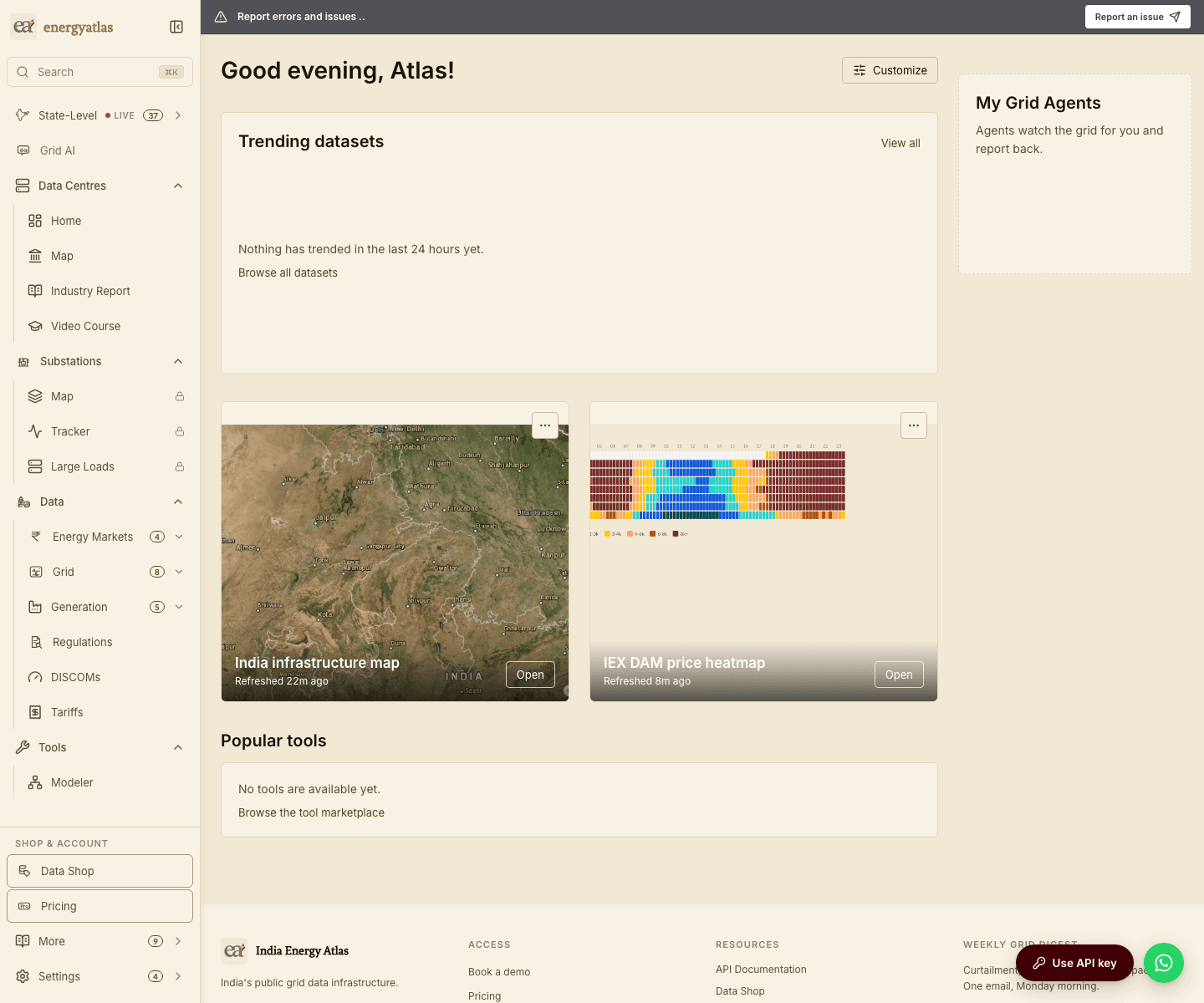
/home, rendered from snapshots the worker took. The line under each title is the age of the picture; Open goes to the live surface.What this version leaves open
Three things, stated so nobody has to discover them. There is no live embed mode yet — every pinned map and chart is a photograph, and the interactive version of the card is a later phase. Metric pins are storable but not yet servable; the enum carries them from this revision on purpose, so the phase that adds metric values does not have to alter a type in place. And how often a card may refresh has a floor on it: the server checks the requested interval against the account's floor on every write and answers a structured refusal the interface turns into an upgrade path, not a raw error. What each plan includes lives on the pricing page.
If you would like to see the surfaces this pins from, the infrastructure map is at /infra and the market charts are on /iex-market. State pages such as Gujarat, Tamil Nadu and Rajasthan carry the same charts with a state focus, and the full catalogue of what can be pinned is at /data.
Sources: sql/migrations/tools_053_home_phase2.sql, services/tools-api/app/home/snapshots.py, services/tools-api/app/home/tasks.py, services/tools-api/app/home/store.py, services/tools-api/Dockerfile and lib/home/pin-surfaces.ts in the India Energy Atlas repositories. Every terminal, SQL and figure capture on this page is pasted or rendered from a run on a clean clone at the Phase 2 tip, on 30 August 2026.